HomeFeaturesScreenshotsOrder Nowstardevelop.com
 
stardevelop.com
stardevelop.com
Live Help - Product Information
  Introduction
  Server Installation
  HTML Code
  Messenger Installation
stardevelop.com
stardevelop.com

stardevelop.com
stardevelop.com
  Sign In
  Chatting
  Pre-typed Responses
  Transferring Chats
  Managing Accounts
  Access Levels
  Settings / Customising
stardevelop.com
stardevelop.com

stardevelop.com
stardevelop.com
stardevelop - Company Information
  Contact / Email
  About Us
stardevelop.com
stardevelop.com

Microsoft Certified Partner

Documentation > Access Levels / Permissions

Access Levels / Permissions

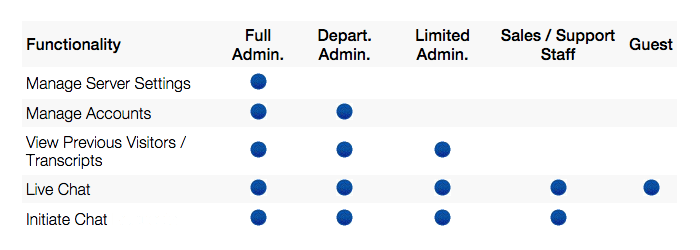
Live Help operators must be configured as different access levels such as Full Administrator, Department Administrator, Limited Administrator, Sales / Support Staff, or Guest. Each of these access levels have access to different functionality within the Live Help Messenger Windows application, as shown below.

Functionality
Full Admin.
Depart. Admin.
Limited Admin.
Sales / Support Staff
Guest
Manage Server Settings
Supported
       
Manage Accounts
Supported
Supported
     
View Previous Visitors / Transcripts
Supported
Supported
Supported
   
Live Chat
Supported
Supported
Supported
Supported
Supported
Initiate Chat Requests
Supported
Supported
Supported
Supported


When an operator does not have access to a specific feature within the Live Help administration they will be shown the following alert. An operator can then Sign-In using an account with higher privileges to access the specific feature.

[ Top ]


Require Further Assistance?

Unable to locate relevant information within the Live Help Documentation? Simply email or chat via. Live Help and we will be glad to assist you.